
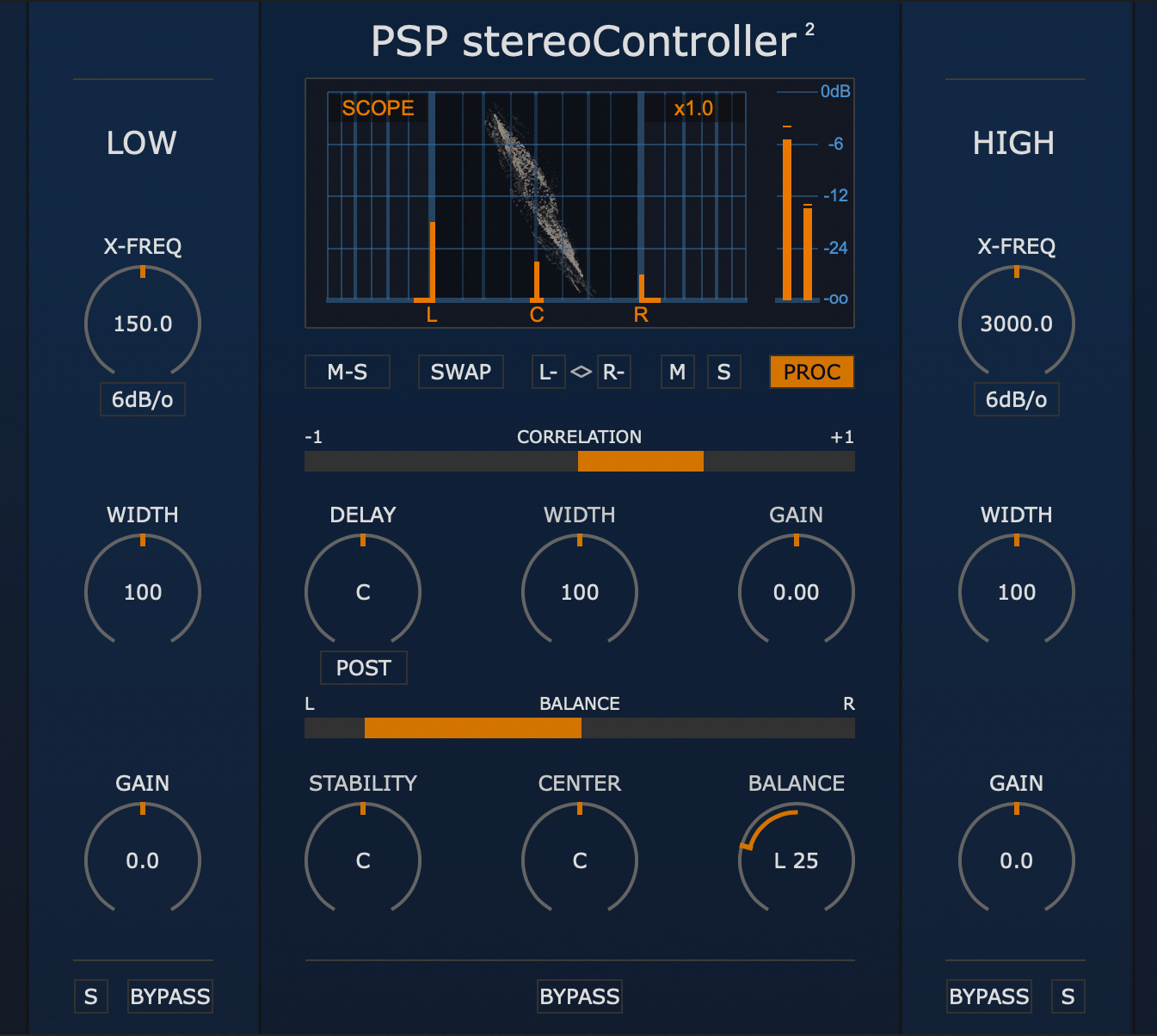
PSP stereoController2
Control Your Stereo!
PSP stereoController2 is designed to control, adjust, and rescue incorrectly recorded dual channel stereo tracks, or process them for specialized applications or cool sonic tricks.
PSP stereoController2 can be used in various situations:
unbalanced stereo image due to level difference between channels, e.g. in dual microphone stereo recordings
slight time alignment shift between channels
a track’s stereo image is too narrow or too wide for the mix
when the center instrument seems to be shifted to one side
virtually emulating an instrument’s location in the soundfield via combined level and delay panning
one or both channels have reversed polarity, or the channels are swapped
decoding a Mid-Side (M-S) encoded track into L/R stereo
reducing the stereo width of low frequencies, or making them mono, for proper speaker or subwoofer replay or for reliably cutting vinyl
widening stereo width of high frequencies for more ‘airy’ harmonics and spaciousness
fine adjustment of stereo imaging during the mastering process
-
When you need detailed control of the stereo nature of a track in your mix you really can't beat this controller. It gives you full control of width and phase as well as a few extra treats to make your mixes more interesting!
-
PSP stereoController2 is one of those simple, lightweight, SwissArmyKnife plugins that may always live in your master fader. Not only it will easily let you control the width of your frequency regions including making bass mono, but you can also use it as a final tonal balance eq, as its crossover filters sound musically outstanding!
-
PSP stereoController2 does what it says on the label and it's my favorite controller for my monitoring chain: it's great to have it ready for managing speaker placement and response, including a full re-work of the crossovers.


High quality signal processing algorithms
Up to 2 ms of delay - can repair up to ~68 cm / 2 ft of distance mismatch between mics
Width expansion up to 400% for narrowly recorded stereo tracks
Master gain control up to ±12dB
Optional dedicated width and gain controls for Low and/or High frequencies
Low and High band gain control up to ±6dB
Stability (sides) balance control without affecting the center content localization
Center control to adjust the panorama location of the center content
Standard balance control of channels
M-S decoder
Output monitoring and solo capability for Mid and Side signals
Channel swap
Polarity switches for both channels
Correlation meter
Balance meter
Dedicated sections for Low and High frequency level and width control
Parameter filtering for smooth and click-free parameter adjustment
Support for sample rates up to 384 kHz
Although both plugins deal with stereo image control, PSP stereoController2and PSP stereoAligner2 are built for different purposes and complement each other in a professional audio workflow.
🎚️ PSP stereoAligner2
Advanced Phase Alignment & Stereo Sculpting
Built around a variable-phase control engine, PSP stereoAligner2 allows you to independently align inter-channel phase across three frequency bands. This enables precise stereo tuning, especially useful for spectrally rich, stereo-recorded sources like grand piano, drum overheads, or orchestral ensembles.
3-band phase alignment for detailed stereo correction
Creative in/out-of-phase effects for sound design
Control over inter-channel delay, balance, and width
Ideal for use in music production, game audio, and post-production
Excellent for both technical correction and creative stereo manipulation
🎛️ PSP stereoController2
Stereo Balance, Panning Correction & Mastering Control
PSP stereoController2 focuses on addressing mic placement issues, incorrect panning, and left-right balance problems in stereo recordings. It gives you precise control over inter-channel delay, center-position panning, side signal balance, and full stereo width.
Designed for post-recording stereo correction
Features Low and High section controls for width and gain
Ideal for fixing mic setups, rebalancing panned instruments, and mastering work
A mastering-grade tool for refining and correcting stereo i
🧩 Complementary Tools - Not Redundant
While there’s some overlap in delay, balance, and width controls, each plugin serves a unique role:
Use stereoAligner2 when you're working with phase-sensitive stereo material or need multi-band spatial precision and creativity.
Use stereoController2 for practical stereo fixes, mic correction, and mastering-focused balance and width shaping.
Main plug-in development and algorithms: Mateusz Woźniak
Development assistant: Piotr Dmuchowski
Project Development: Mateusz Woźniak
Additional Development: Piotr Dmuchowski
Plug-in Design and Graphics: Mateusz Woźniak
Platform: Adam Taborowski
Installer: Piotr Dmuchowski
Product Manager: Antoni Ożyński
Documentation: Mateusz Woźniak, Mike Metlay
In order to run PSP stereoController2 in 30-day trial mode or activate it, you need an iLok user ID which you can create for free at www.ilok.com, and you need to install the free iLok License Manager application but you don't need any hardware dongle.
You can activate the license in 3 separate locations, each of which can be either a computer or an iLok dongle (2nd generation or above). You can move these licenses at any time using PACE's iLok License Manager software.
PC
VST3
Windows 7 – Windows 11
64-bit VST3 compatible application
VST
Windows 7 – Windows 11
64-bit VST compatible application
AAX
Windows 7 – Windows 11
Pro Tools
All DAWs
The latest iLok License Manager application installed
macOS Intel or macOS Silicon
AudioUnit
macOS 10.14 – macOS Tahoe
64-bit AudioUnit compatible host application
VST
macOS 10.14 – macOS Tahoe
64-bit VST compatible host application
VST3
macOS 10.14 – macOS Tahoe
64-bit VST3 compatible host application
AAX
macOS 10.14 – macOS Tahoe
Pro Tools
All DAWs
Up to date iLok License Manager application installed
VST and VST3 are trademarks and software of Steinberg Media Technologies GmbH. AAX and Pro Tools are trademarks or registered trademarks of Avid Technology, Inc. AudioUnit, OSX and macOS and macOS Silicon are trademarks of Apple Inc. iLok is a trademark of PACE Anti-Piracy, Inc.